Any message can become a task.
Promote a chat message into a tracked task without leaving the thread — source conversation attached, forever linked.
Witex unifies chat, tasks, and projects in one Mac-native workspace — so every decision leaves the room with an owner, a date, and the context to get it done.
The meeting ends, the channel keeps moving, and three days later nobody remembers who owned the follow-up. Witex keeps the promise, the person, and the proof in one place.
Promote a chat message into a tracked task without leaving the thread — source conversation attached, forever linked.
Assignee, due date, priority, project, and attachments live on the work itself — not in someone’s memory.
The dashboard surfaces what’s open, due soon, and newly moved — so status meetings stop being archaeology.
Discussion and delivery share the same workspace. Threads keep the story; tasks keep the score. Jump from a task straight back to the exact message that started it.
Messages, tasks, typing indicators, and notifications stream live. If your connection drops, Witex tells you — then reconciles the moment you’re back.
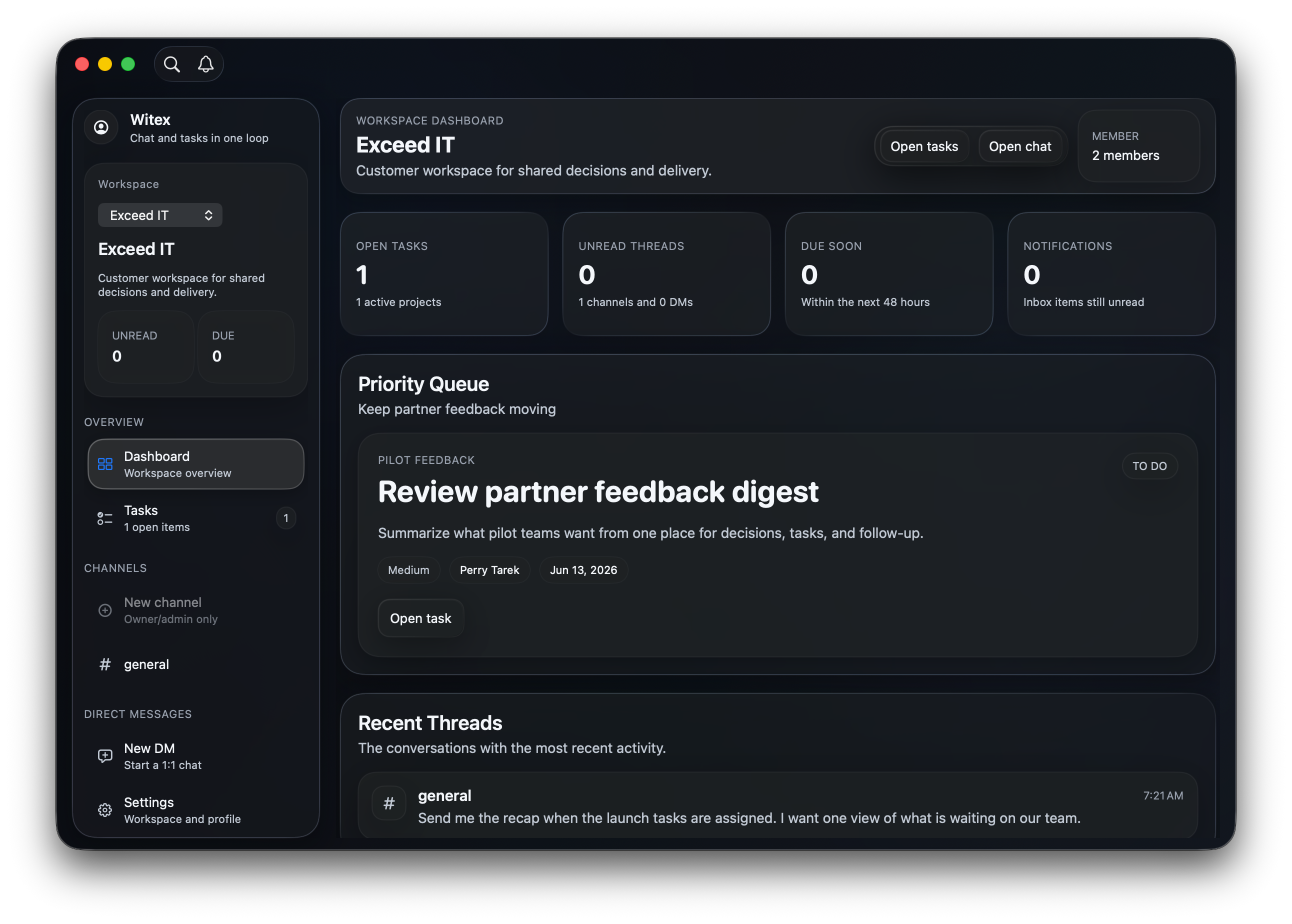
Open tasks, unread threads, due-soon work, and a priority queue — one calm view before the day gets loud.
Group tasks into projects with inspectors, activity feeds, and attachments that stay with the work.
An adaptive Liquid Glass interface built for macOS — fast, quiet, and at home on your desktop.
Every core move in Witex has a shortcut. Search, navigate, create — without touching the mouse.
Real screens from the app, staged for a team preparing a customer launch. Built for the moment someone asks: what changed, and what do we do about it?
Open loops, recent movement, and due-soon work gathered into one calm starting point.
Witex is built around one habit: when something important surfaces, make the next move visible before it becomes another thing to remember.
A customer note, a meeting promise, a launch risk — it arrives while the team is already moving.
Assign the owner, due date, and supporting context while the decision is still warm.
Live threads, notifications, and the task board keep progress visible — no chasing, no chasing the chasers.
“Great teams don’t win by remembering everything. They win because the important things have a place to go.”
The idea behind WitexDownload the private beta, open Witex, and give your team one focused place where decisions turn into action.